Visualize ARXML & DBC files - explore your vehicle platform
Every automotive team has an architecture diagram. And every architecture diagram is wrong. New ECUs get added, channels get rewired, services move, but the diagram stays frozen in the last review meeting. With the Tree view to show a platform in RemotiveStudio, the actual topology becomes visible: browse ECUs, channels, and services in a tree view and drill into how things really connect.
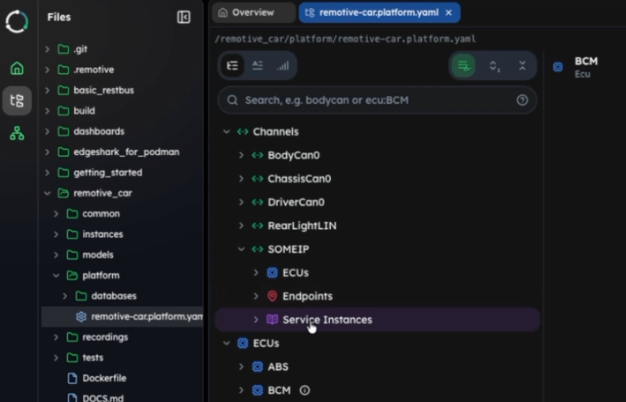
Easy navigation of ARXML, DBCs, and other platform files
Architecture diagrams go out of date the moment someone pushes code. Getting an accurate picture of your vehicle network usually means one of three things: having access to expensive tooling, knowing the one person who maintains the master diagram, or spending hours inside files that weren't built to be human-readable. In large organizations with multiple release trains, this creates a recurring pain — teams plan against assumptions, not facts.
Tree view of ARXML and DBC files: Show platform
Show platform in RemotiveStudio lets you load your actual platform files (ARXML, DBC, FIBEX and LDF - and explore them as a navigable, searchable tree). You see your vehicle network as it truly exists in your files today, not as it was once designed to be.
Exploring a vehicle platform in RemotiveStudio: loading a platform, navigating ECUs and CAN channels, tracing a BCM connection across two buses, and finding where a SOME/IP service (GearService) is hosted — its socket and full URL. Demonstrated using our open RemotiveCar example on GitHub, but the same workflow applies directly to large, complex ARXML and DBC files.
Instead of a static architecture drawing, you get a tree structure to drill into: start from an ECU/channel, see which channels/ECUs it connects to, and drill further into endpoints, sockets and service instances. This is especially valuable for large, complex platforms where a diagram would never tell the full story.
[nfobox]
About RemotiveStudio RemotiveStudio is the UI to interact with the RemotiveLabs platform interactively and intuitively - alongside the command-line interface, since everything you see in the platform you can also script. The show platform is part of its initial feature set, alongside show instance (how the platform is instantiated and how it runs) and dashboards (signal visualisation for a running platform). More features are on the way. Learn more: RemotiveStudio documentation.
[/nfobox]
Tree view: What you can do with show platform view (ARXML/DBC viewer/explorer):
- Browse the full topology. Navigate your entire platform in a tree view - ECUs, channels, endpoints, all in one place.
- Understand ECU connectivity. Pick any ECU, such as the BCM, and immediately see every channel it is connected to - including secondary buses that rarely appear on architecture drawings.
- Trace services end-to-end. Search for a SOME/IP service and see exactly where it's exposed and where it's consumed. The same flow works for CAN and LIN.
Work with your existing files. Bring a DBC, ARXML, LDF, FIBEX, or a combination. Show platform reads your files directly - no conversion needed.
[nfobox]
FAQ
How do I view an ARXML file?
ARXML files are XML-based and technically openable in any text editor, but the deeply nested AUTOSAR structure makes manual navigation impractical at any real scale. RemotiveStudio loads your ARXML directly and renders it as a searchable tree — ECUs, channels, endpoints, and services — so you can explore the topology without reading a line of XML.
How do I view a DBC file?
DBC files are plain text and readable in a text editor, but tracing signal definitions, message IDs, and node relationships across a large file is tedious and error-prone. With RemotiveStudio, loading the DBC gives you an immediate visual tree of every node and channel, with connectivity visible at a glance.
Can I view ARXML and DBC files together?
In isolation, ARXML and DBC files each describe part of a vehicle network, but there's no native way to view them side by side in context. RemotiveStudio lets you combine them — along with LDF and FIBEX files — into a single platform view using a lightweight YAML descriptor, with no manual conversion.
[/nfobox]
Check out the latest from us

.png)

.jpg)
.jpg)
Join the automotive rebels that #getstuffdone with RemotiveLabs!